ESPN + Claude
Connect ESPN to Claude
Yes: League Loom connects Claude to live ESPN rosters, projections, matchups, and waiver pools, with public leagues needing only a league URL and private ones using your own espn_s2 and SWID cookies.
The connector is free and read-only, and it works in ChatGPT too. Add it on a computer under Customize, then Connectors, then ask Claude from your phone.
Connect your leaguesLooking for ChatGPT setup too? See Connect ESPN to ChatGPT and Claude.
Looking for your private-league cookies? See Find espn_s2 and SWID.
Last updated
Claude read your ESPN roster and both backs' Week 11 matchups, then weighed projections against defense rankings.
Claude scanned your ESPN league's available players and matched the top adds to your thin spots at running back.
Claude compared both players' rest-of-season value against your ESPN roster's needs and scoring.
| Player | Pos | ROS rank | Your need |
|---|---|---|---|
| Garrett Wilson | WR | WR14 | WR depth: solid |
| Breece Hall | RB | RB8 | RB depth: thin |
Illustrative example, not a live league report. Your answer depends on your league data and AI tool.
2 minutes
How to connect
Add the connector in Claude
In Claude, open Settings, then Customize, then Connectors, and choose Add custom connector. Give it a name, paste https://leagueloom.com/mcp as the Remote MCP server URL, then approve the sign-in.
Connect your ESPN league
Choose ESPN. Public leagues need nothing; private leagues use your own espn_s2 and SWID browser cookies, which stay sealed in your connection (with an optional encrypted email recovery backup).
Ask Claude
Claude can now read your ESPN league. Ask about your roster, start/sit, waivers, trades, and matchups in plain language, across every team you manage.
What the setup page looks like
Screens from leagueloom.com/setup, shown with empty fields. Select a screen to open it full size.
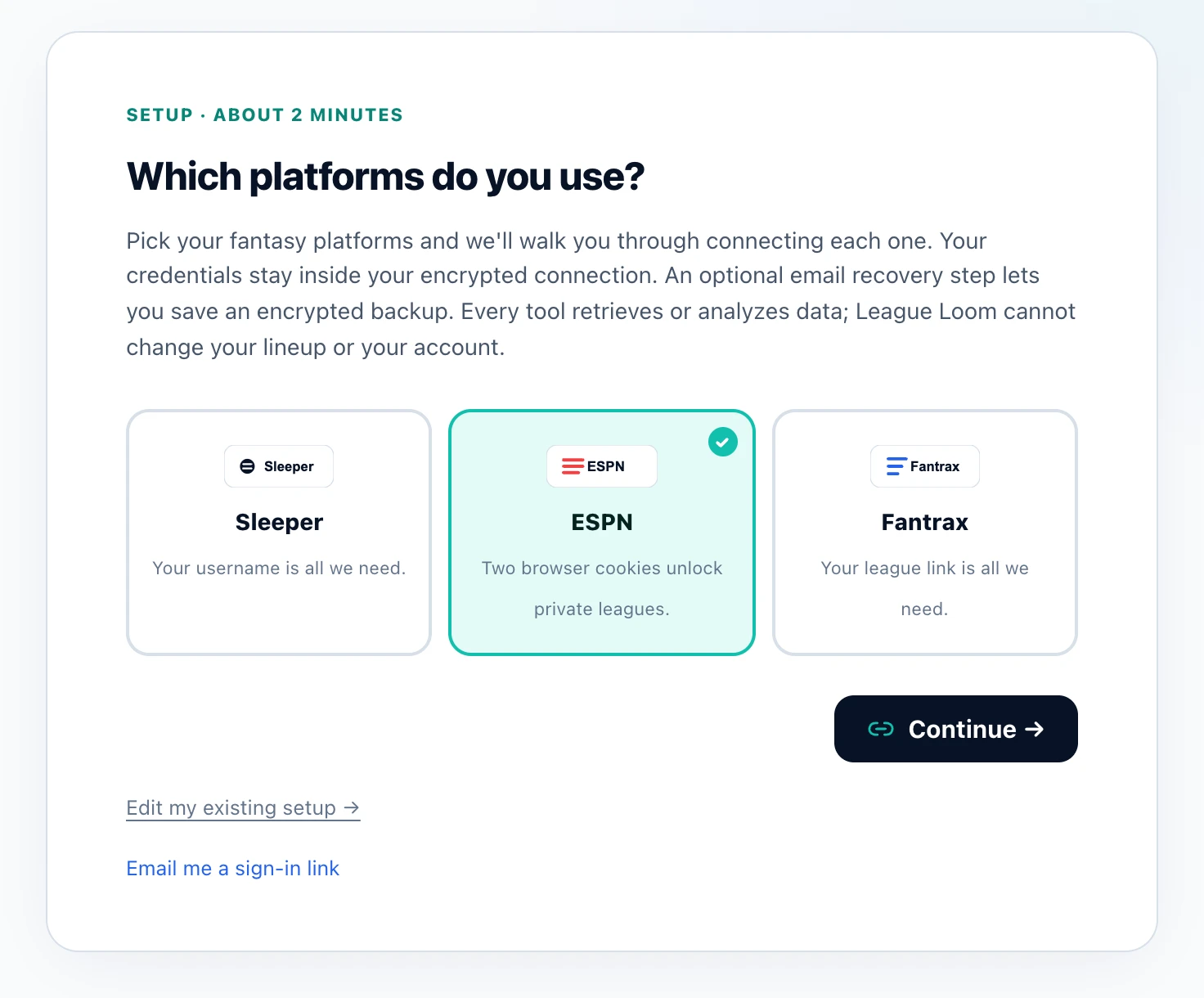
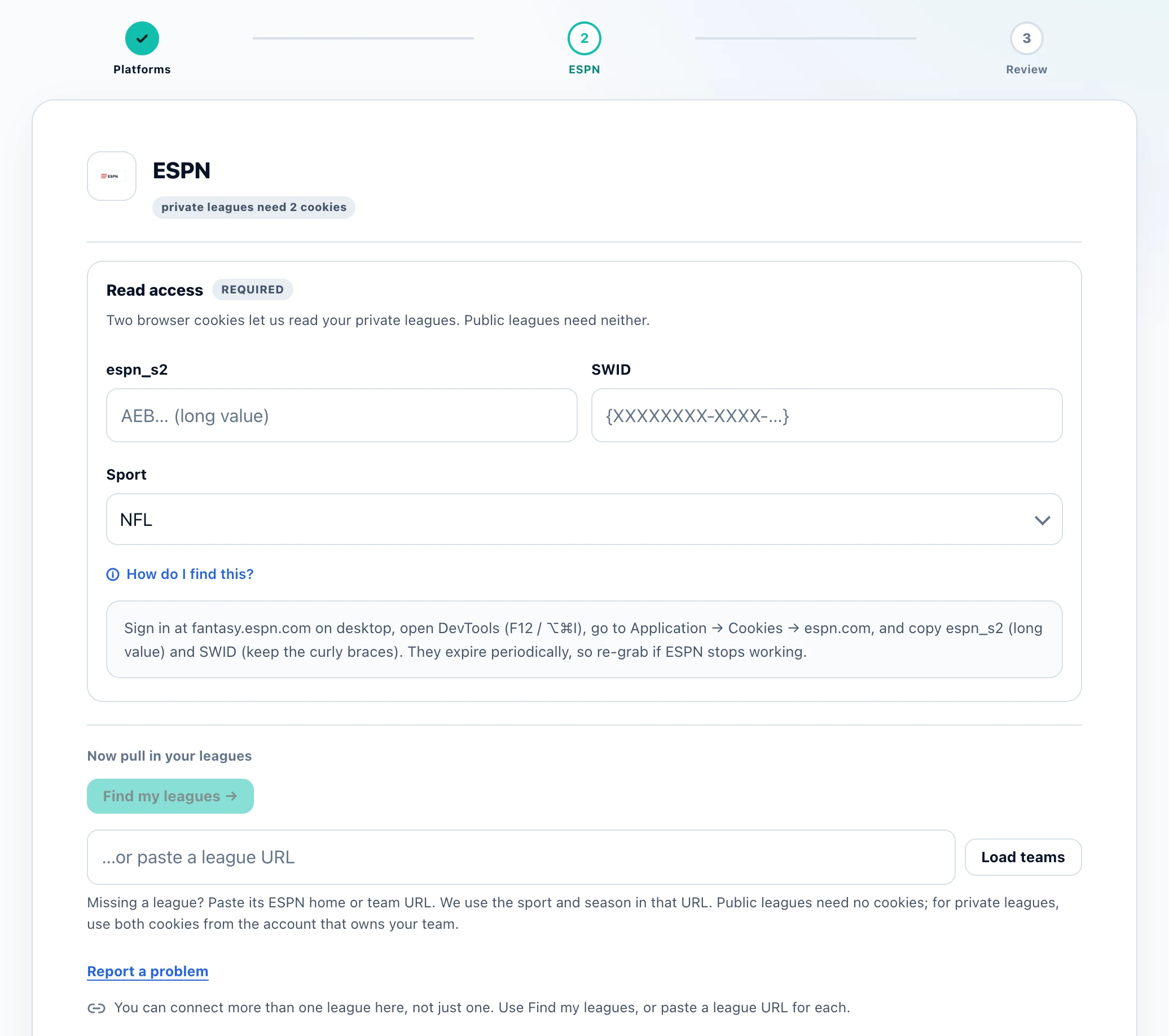
Adding a connector is a job for a computer. Send yourself the link and finish there.
https://leagueloom.com/mcpYour tool asks for a name and this URL. Then connect your leagues in the setup wizard. Personal team selection is optional.
Why League Loom
ESPN + Claude
Unlike pasting screenshots or box scores into a chat, League Loom gives Claude a live, structured view of your ESPN league, so Claude reasons over your real starters, bench, opponent, and projected points instead of guessing. ESPN supports standard, PPR, half-PPR, and deep dynasty formats, and League Loom hands all of that context to Claude in one connection, so every answer reflects your scoring and your roster.
Claude adds one thing the other assistants do not: once the connector is added, League Loom's built-in prompts appear in Claude's own connector menu, so the weekly rundown, waiver targets, and lineup help are a menu selection rather than something you paste. The setup path is also Claude-specific.
Connectors moved under Settings, then Customize, so the older Settings, then Connectors path now shows a notice instead of the screen you want.
FAQ
Questions
Can Claude really read my ESPN league?
Yes. Once you add League Loom as a connector, Claude can read your ESPN rosters, projections, matchups, standings, and waiver wire live, then answer questions grounded in your actual team.
Does this work with private ESPN leagues?
Yes. Public ESPN leagues need nothing extra. For private leagues you provide your own espn_s2 and SWID browser cookies, which are sealed inside your encrypted connection and never stored in the open.
Will Claude change my ESPN lineup or make moves?
Current connector tools recommend start/sit choices and waiver targets; no write-action tools are registered today.
What does it cost to connect ESPN to Claude?
Nothing. League Loom is free. You add the connector, pick or point to your ESPN league, and start asking Claude questions.
Which ESPN formats are supported?
Standard, PPR, half-PPR, and dynasty leagues all work. League Loom passes your league's scoring and roster settings to Claude so answers match your setup.
Where is the Add custom connector button in Claude?
Open Settings, then Customize, then Connectors, and choose Add custom connector. Connectors used to sit directly under Settings, and that older path now shows a notice rather than the screen you need. Paste https://leagueloom.com/mcp as the Remote MCP server URL, then approve the sign-in.
Do League Loom's prompts show up inside Claude?
Yes. Once the connector is added, League Loom's six built-in prompts appear in Claude's connector menu, so the weekly rundown, weekly newsletter, waiver targets, lineup help, power ranking and a teams overview can be picked from the menu instead of pasted in. The longer routines, such as the draft kits and the five football decision prompts, are on the prompt library page to copy.
Which ESPN sports can Claude read through this connection?
NFL, NBA, MLB, NHL, and WNBA ESPN leagues. One ESPN connection can cover several leagues at once, and you can add Sleeper or Fantrax leagues alongside them and ask Claude about all of them in a single question.
Can I set League Loom up on my phone?
Add the connector on a computer: claude.ai or Claude Desktop, or ChatGPT on the web. What works on a phone afterward depends on the assistant. In Claude, a connector added on the web or desktop is also available in the Claude iOS and Android apps, so you can ask about your leagues from your phone. In ChatGPT, custom apps like League Loom currently run only on the web, not in the ChatGPT phone apps. If you start on a phone, use Send to my computer to email or message yourself the link and finish later.
Before you connect a league, read how League Loom is built, what the privacy policy says is stored, the terms of service and the full FAQ, or check the press kit with key facts and who builds it.
Ready in two minutes
Bring League Loom to your AI tool
Free connector, private setup, and 18 current tools that retrieve or analyze your league data. No write-action tools are registered today.